Launching DELO-DD CLI v1.1.0
Launching DELO-DD CLI v1.1.0
August 12, 2026
We're releasing DELO-DD v1.1.0, our drift-diffusion simulation software for OLED device design and analysis. Give it a device's layer structure and physical parameters, and it computes the full electrical picture — J-V, C-V, C-f, and M-f. With this release, three modes work from a single command-line tool: run a simulation, fit real measurement data, or generate synthetic datasets at scale.
Understanding an OLED means understanding what happens inside it. Measurement only shows you the terminals — the current, the capacitance, the impedance. The mobilities, the energy levels, the recombination in each layer stay hidden. That is the gap DELO-DD is built to close. Give it a device, and it computes what the terminals can't show you.
Three modes, one tool
DELO-DD v1.1.0 brings simulation, fitting, and generation together under one delo command-line tool. Each mode stands on its own — run whichever one the task in front of you calls for.
Simulation
One device structure in, the full electrical picture out — J-V, C-V, C-f, and M-f, solved from the drift-diffusion equations.
BasicFitting
Measured J-V, C-V, and M-f data in, the layer-by-layer parameters behind it out, found by global optimization.
ProGeneration
Parameter ranges in, a large batch of fully simulated synthetic devices out, stored in a query-ready database.
ProSimulation
Give it a device. Get the full picture.
Stack the layers, set the parameters, run. sim mode takes a single OLED structure, solves the drift-diffusion equations, and returns J-V, C-V, C-f, and M-f.
Build up to six layers, cathode to anode. For each one, set thickness, HOMO and LUMO levels, electron and hole mobilities, Poole-Frenkel coefficients, and recombination. Built-in voltage-axis correction and series resistance line the simulation up against your real measurement setup. Run only the measurements you need — each one produces a plot image to glance at and a CSV to work with.
It doesn't stop at the terminals. At any bias point, DELO-DD returns the internal state of the device: carrier and exciton distributions, electric field, potential, current, and mobility resolved across the stack. Not just what the device does — what's happening inside it.
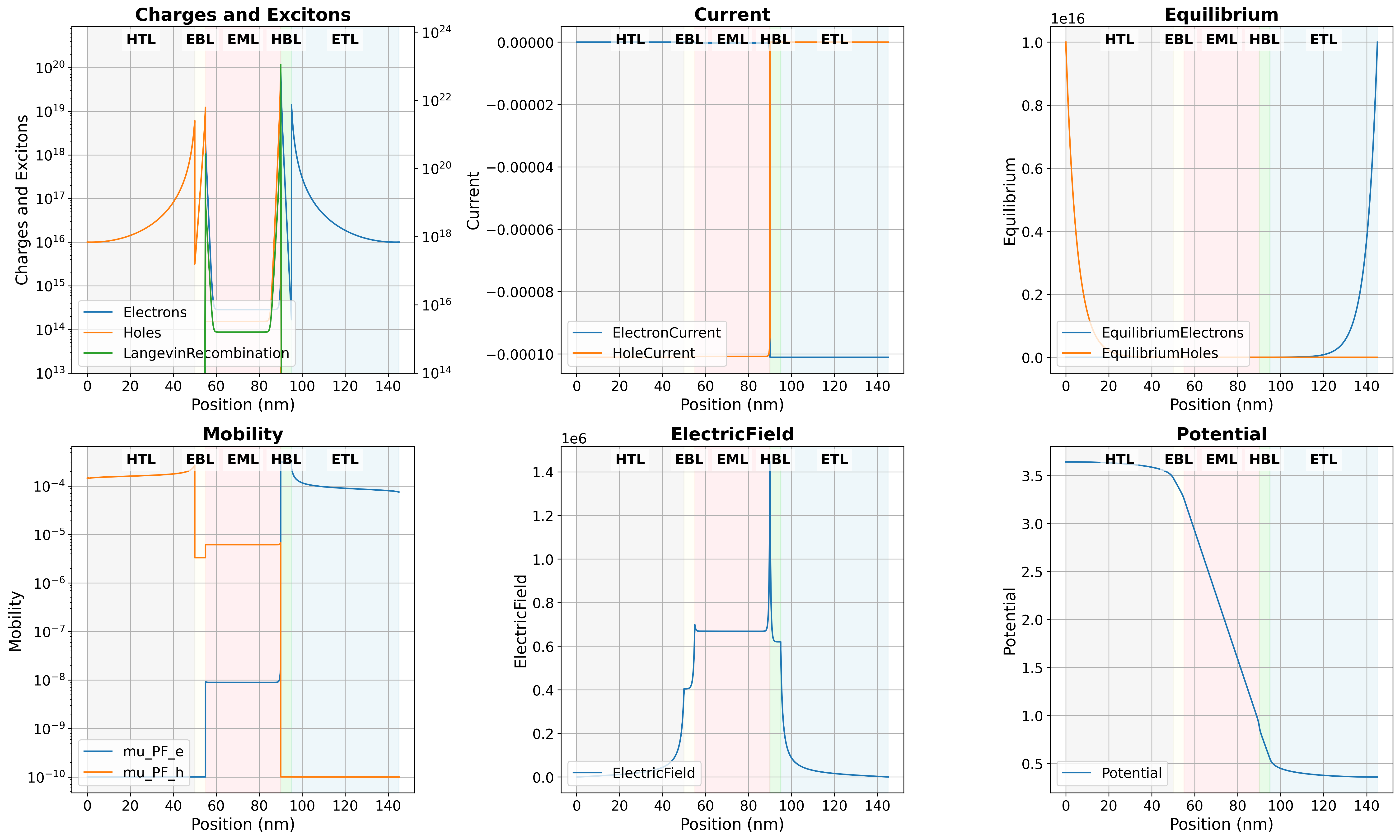
Sim mode results
Fitting
Give it measured data. Get the parameters behind it.
Point fit mode at your measured J-V, C-V, and M-f data, and a global optimization algorithm searches for the layer-by-layer parameters that reproduce it.
Fix what you already know, search only what you don't — parameter by parameter, layer by layer. Tie parameters together as energy barriers instead of absolute levels, and the physical relationships between adjacent layers hold throughout the search. Loading data is effortless: encoding, delimiters, headers, and units are auto-detected, with a warning when something looks off. A CSV straight off your measurement rig just works.
Voltage-axis alignment, thickness correction, and series resistance close the gap between an ideal model and a real measurement. When fitting finishes, R² comparison plots and convergence curves let you verify the result at a glance. The best parameters are written to a file you can hand straight back to sim mode — and with verification on, DELO-DD re-simulates with them automatically. Data in, validated model out.
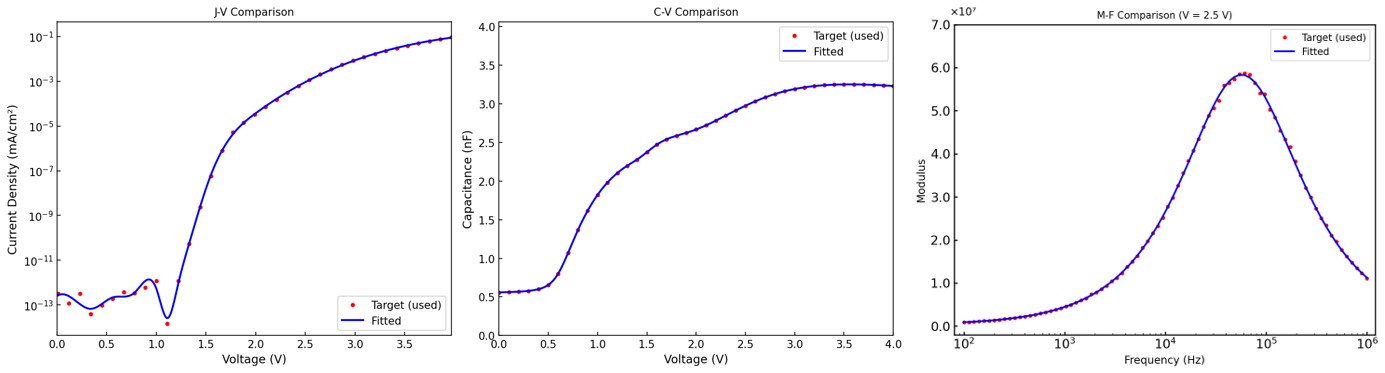
fit mode Target vs Simulation comparison and R² convergence curve, showing how closely the fit reproduces the measured data.
Generation
Define the space. Get the dataset.
gen mode generates datasets. Define ranges for your layer parameters, and DELO-DD samples them, builds a large batch of synthetic OLED devices, and runs a full simulation on every one.
Fix what stays constant, range what varies, and sample in linear or log space to fit each quantity's scale. Agents run in parallel, so the batch doesn't crawl. Set a seed and the exact same dataset comes back whenever you need it — because experiments have to be repeatable. Every device's parameters and results are stored together in a SQLite database, structured for a machine learning pipeline to read straight off.
Managing the output is just as simple. List every device, inspect one in detail, filter by condition, pull summary statistics, and export to CSV or JSON — generation, inspection, and export, all in one tool.
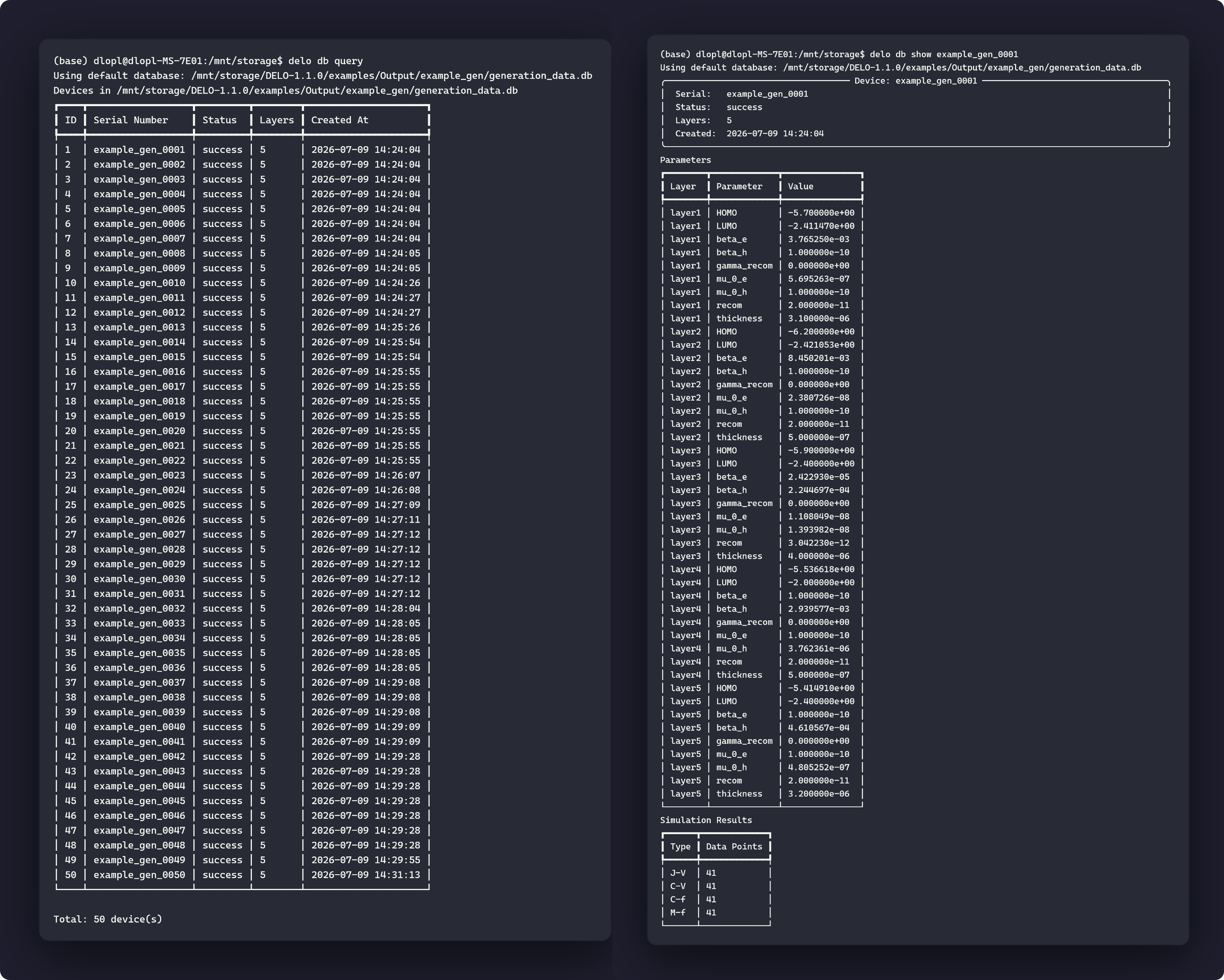
Browsing the 50 generated devices with delo db query (left), and inspecting one device's layer parameters and simulation results with delo db show (right).
Available now
DELO-DD v1.1.0 is available today as a command-line tool. Simulation runs on a Basic license; fitting, generation, and the database commands require Pro. Licensing is served from a license server on your own network, so the devices you simulate, the measurements you fit, and the datasets you generate stay on your own machines. To get started or to talk through licensing, contact the EMITTING SQUARE team at emsquare@emsquare.ai.kr.
Coming soon
This release runs from the command line. A graphical version of DELO-DD is on the way — the same engine with a visual interface — coming soon.